Your Clinic's Own WhatsApp Number: What Embedded Signup Asks of a Clinic
Key takeaways
- Embedded Signup is one Meta pop-up: log in, pick the business, add the number, set the display name, allow access.
- Most trouble starts before the pop-up: a number still on the WhatsApp app, a Meta account owned by one staff member, documents that do not match the legal name.
- After it, the clinic owns the display name review, its own Meta bill, its own message templates and its quality rating.
- If the main goal is "patients should see our clinic name", count these costs first; a shared number gets a clinic live the same day.
Shared number or your own: what actually changes
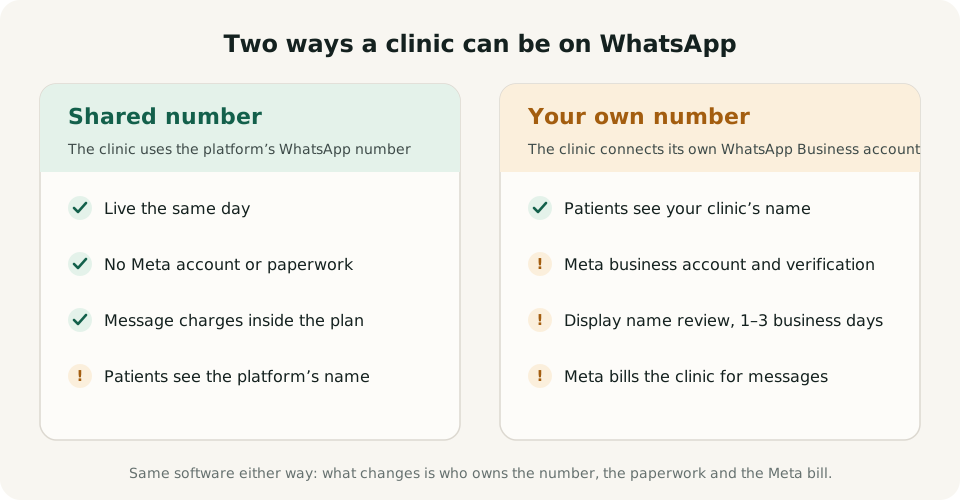
A clinic can send booking and queue messages on WhatsApp in two ways. On a shared number, patients message the software's WhatsApp number and the software knows which clinic they mean from the QR they scanned. On its own number, the clinic connects its own WhatsApp Business account and patients chat with the clinic's name at the top.
The software does the same work either way: tokens, appointments, reminders, the your-turn message. What changes is who owns the number, who does the Meta paperwork and who pays Meta for the messages. That is what this guide is about.
What Embedded Signup is, in plain words
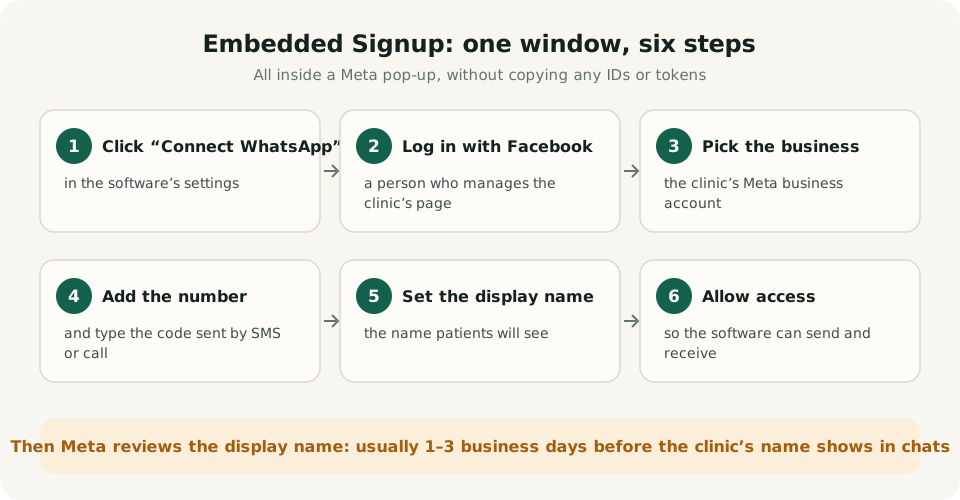
Embedded Signup is the way Meta lets a software company connect a business's WhatsApp number without the business copying IDs and tokens by hand. The clinic clicks "Connect WhatsApp" inside the software, a Meta window opens, and six steps follow: log in with Facebook, pick or create the clinic's Meta business account, add the phone number and type the code Meta sends by SMS or call, set the display name, and allow the software to send and receive messages.
When everything is ready this takes minutes. Then Meta reviews the display name, usually within one to three business days. The steps are simple; the problems below are what make clinics stop half way.
Problem 1: the number is already on WhatsApp
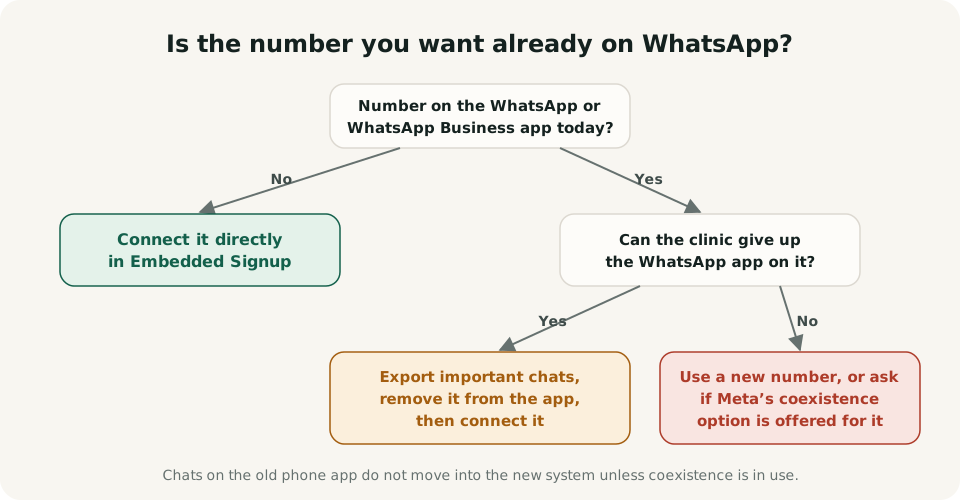
This stops more clinics than anything else. The number the clinic wants is usually the one printed on its board, and that number is already on the WhatsApp or WhatsApp Business app on the reception phone. A number cannot normally be on the phone app and connected to the API at the same time.
There are three ways out. Use a new number that has never been on WhatsApp, which is the cleanest. Or remove the existing number from the phone app first, after exporting the chats that matter, because those chats stay on the old phone and do not move into the new system. Or, where Meta offers it, use its coexistence option, which lets a number stay on the WhatsApp Business app while it is connected; it is not available for every number, and it comes with its own limits, so check before planning around it.
A small but common delay: the "spare" number turns out to be still logged in to WhatsApp on an old phone in a drawer. Check every phone before starting.
Problem 2: who owns the Meta business account
Embedded Signup creates or uses a Meta business account, and whoever logs in becomes its admin. In many clinics that is the person who happens to be at the desk that day, or a nephew who set up the Facebook page years ago. When that person leaves, the clinic can lose access to the account that owns its WhatsApp number.
Log in as the doctor or the owner, or as someone who will be around for years, and add a second admin straight away. Keep the two-step PIN for the number written down somewhere safe; Meta asks for it when the number is registered again.
Problem 3: business verification and the daily limit
A new, unverified business can only start conversations with a limited number of people a day; at the time of writing Meta's starting limit is 250 people in 24 hours, and Meta changes these rules from time to time. Replies to patients who message first do not count against it, but reminders and your-turn messages to patients who booked at the desk do. A busy clinic can reach that limit.
Business verification raises the limit. Meta asks for a document that proves the clinic exists, such as a GST certificate, a Shops and Establishment registration or a partnership deed. Most rejections come from a name mismatch: the business name typed in Meta has to match the document letter for letter. Have the document scanned before starting.
Problem 4: the display name patients see
The display name is the reason most clinics want their own number, and it has its own review. Meta checks that the name matches the business and follows its naming rules. Names that look like a description ("Best Child Doctor"), use capitals for emphasis, or do not match the board and documents tend to be sent back.
Until the name is approved, what patients see at the top of the chat may not be the clinic's name yet, and a rejected name goes back for another review. Use the name on the clinic's board and its documents, and plan the switch-over for after approval.
Problem 5: Meta bills the clinic directly
On its own number the clinic is the one Meta charges. That means adding a payment method to the Meta account, watching a second bill, and understanding Meta's per-message prices, which differ by message type and change over time. If the card fails, messages that need a template, such as reminders sent the next day, stop going out.
On a shared number these charges are usually part of the software's price. With TOKENN they are inside the booking credits, so there is no separate Meta bill. The WhatsApp Business API setup guide explains how Meta's message charges work.
Problem 6: message templates live in the clinic's account
WhatsApp lets a business reply freely for 24 hours after a patient writes. Anything later, such as an appointment reminder the next morning or a your-turn message to a patient who went home, has to use a pre-approved message template. On its own number, those templates must be created and approved in the clinic's own Meta account.
Templates get rejected for promotional wording or the wrong category, and an approval can take from minutes to a day or more. Until they are approved, the automatic reminders that need them cannot go out. Ask the software provider whether it creates and submits the templates for you.
Problem 7: quality rating and blocked messages
Meta rates every number by how patients react to its messages. If many patients block the number or report messages as spam, the rating drops, and Meta can lower how many people the number may message or pause it. On a shared number the provider watches this across all its clinics; on its own number the clinic carries it alone.
Clinic messages are usually welcome: a token number, a reminder, a your-turn alert. Trouble starts with offers and health tips sent to everyone who ever booked. Keep the number for bookings and the queue, and the rating stays healthy.
Problem 8: posters, saved contacts and the switch-over day
Moving to a new number means every QR poster, visiting card and Google listing that carries the old number needs replacing, and regular patients who saved the old number keep messaging it. Print new posters before the switch, keep the old number answering for a few weeks with a message that gives the new one, and update the clinic's Google listing on the same day.
A checklist before you start
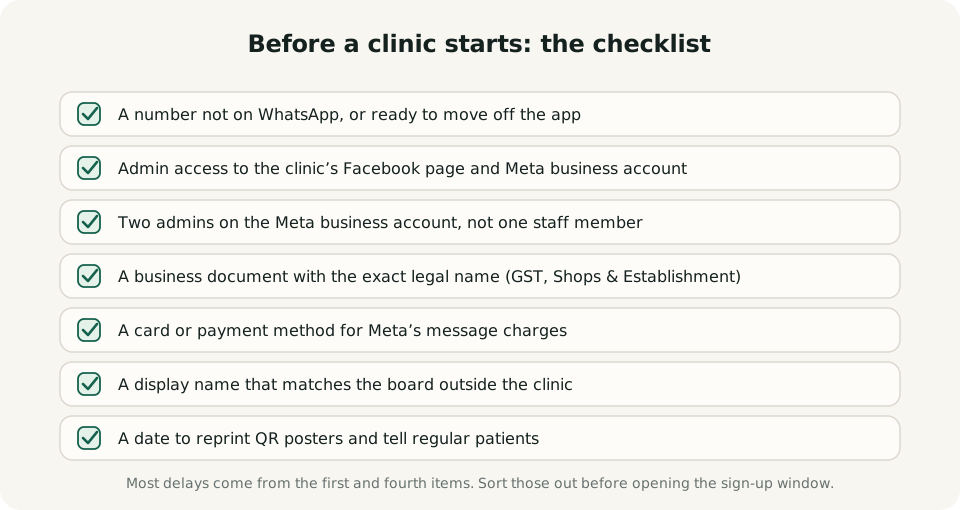
Sort out these seven things before anyone opens the sign-up window. Most delays come from the first and the fourth.
When a shared number is the better choice
For most single-doctor clinics a shared number is simpler: live the same day, no Meta account, no second bill, no templates to manage, and the patient still sees the clinic's name in every message, because the software writes it into the messages. A clinic that wants its own name at the top of the chat, already has a verified business and expects thousands of messages a month has more reason to take on the work above.
TOKENN runs every clinic on its shared WhatsApp number today, which is how a clinic goes from sign-up to its first token in minutes. The WhatsApp assistant for clinics page shows what patients can do on it. If your clinic needs its own number, tell us on WhatsApp; it is on our list, not in the product yet.
Frequently asked questions
Can a clinic use the number already on its reception WhatsApp?
Not as it is. The number must come off the phone app first, after exporting the chats that matter, or the clinic uses a new number. Where Meta offers coexistence, a number can stay on the WhatsApp Business app while connected, with limits.
How long does Embedded Signup take?
Minutes of clicking when the number, the Meta login and the business document are ready, then usually one to three business days for Meta to review the display name.
Does the clinic pay Meta itself?
On its own number, yes: Meta charges the clinic per message and needs a payment method on the account. On a shared number the charges are usually inside the software's price.
What happens if the staff member who set it up leaves?
If they were the only admin of the Meta business account, the clinic can lose access to the account that owns the number. Use the owner's login and add a second admin on day one.
Does TOKENN support a clinic's own WhatsApp number?
Not today. Every TOKENN clinic runs on TOKENN's shared WhatsApp number, with the clinic's name in every message. If your clinic needs its own number, tell us on WhatsApp.
Related guides
WhatsApp Business API for Clinics: Setup Guide →
WhatsApp vs SMS for Patient Reminders: Which Actually Works? →