Token display system for clinic waiting rooms: any Android TV, no hardware
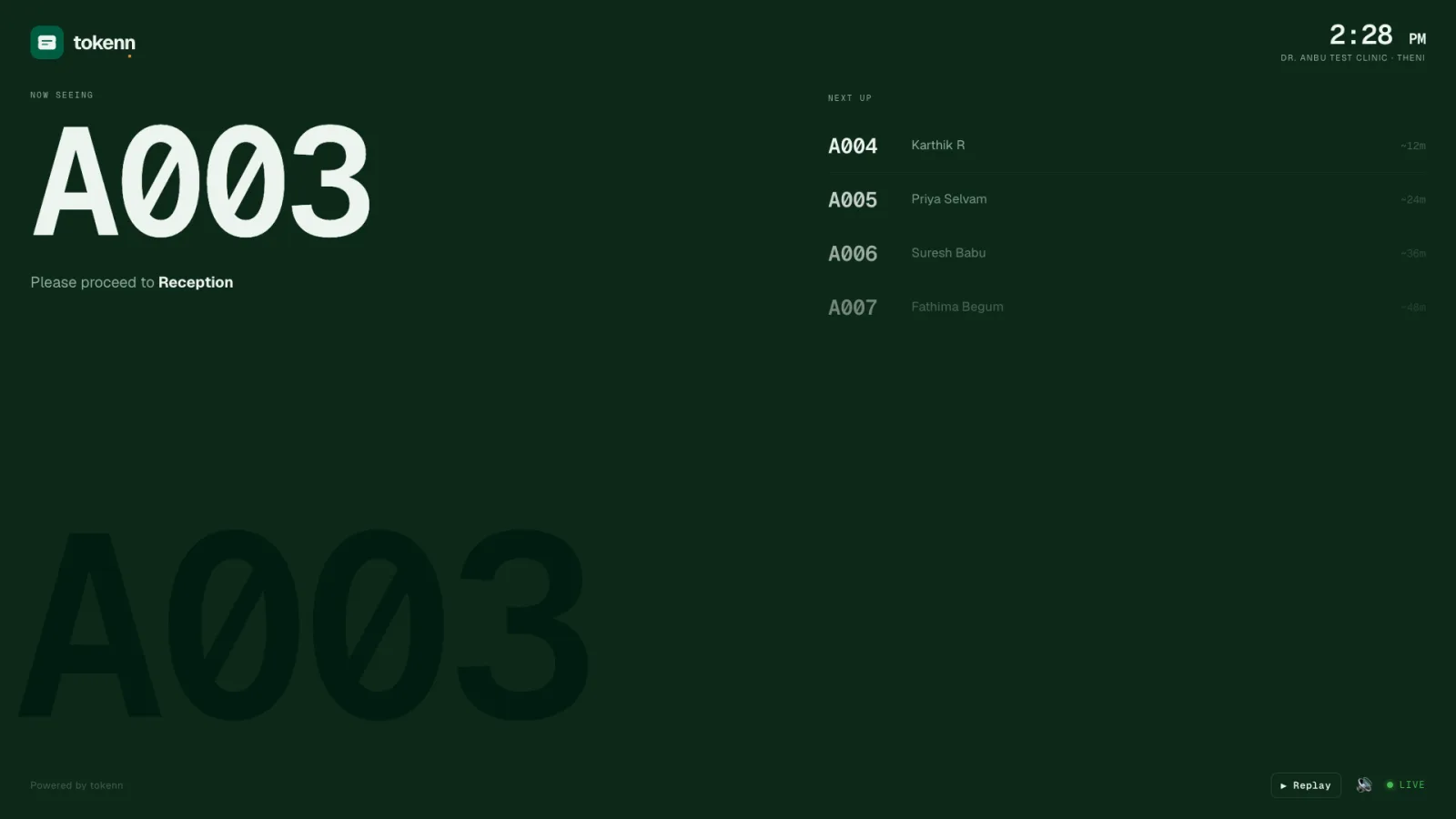
A token display system for a clinic used to mean a ₹30,000 board with a thermal printer and a maintenance contract. TOKENN's is a web page. Your waiting-room display lives at tokenn.live/display/your-clinic-slug, runs in any TV browser, shows the token being seen and the next four, and announces each call out loud. This page explains what the display shows and why a TV beats a board, then walks through three ways to get it onto the TV already on your wall, plus a setup that launches it by itself every morning.
What a clinic TV token display shows
The screen has three parts. The number being served, large enough to read from the back of the room, with the room or counter the patient should go to. The next four tokens, so the people who are close know it and the people who are not can stop staring at the screen. And the clinic's name and the time, so the display looks like the clinic's own board rather than a vendor's advert.
It updates the moment reception taps "Done, call next" on the dashboard, with no refresh and nothing for staff to touch on the TV. WhatsApp bookings and walk-in tokens appear on it in the same order, because they are one queue. A clinic that runs more than one department opens one display per queue, so the dental chair and the consult room each call their own numbers, or a combined board that shows every department on the one TV.
A now serving display for a clinic that calls the number aloud
A silent board still needs someone to shout. TOKENN's display speaks each call through the TV's browser: the token number, then the room. Patients who cannot read the screen, or who are looking at their phone, hear their number. The receptionist stops calling names across a full room, and the display never says a name or a visit reason, only the token, which matters in a gynecology or dermatology waiting room more than most.
The spoken call and the WhatsApp your-turn message go out at the same moment, so a patient waiting outside gets the message while the room hears the number. One tap at reception, both channels.
A waiting room display for a clinic that owns a TV, not a kiosk
An Android TV queue display costs nothing extra because the TV is already on the wall. Any Android TV opens it in its browser, a phone can cast it, and a budget TV without a browser gets a free one from the Play Store, which is what the three methods below cover. A tablet on a stand, a Fire TV stick or an old laptop plugged in over HDMI all work the same way. There is no board to mount, no printer to jam and no maintenance contract, which is the whole of the kiosk comparison in one sentence.
The display is the last of the three parts of the queue: the OPD queue on the receptionist's screen, the WhatsApp token booking on the patient's phone, and this, on the wall. It comes with every token at ₹1 per patient; the first 150 tokens are ₹149.
Token display system price: the TV you own, one rupee a patient
A token display system for hospitals is usually priced as hardware. A bare LED token display board with a voice chime lists at ₹3,000 to ₹7,500 a piece on Indian marketplaces; add the token dispenser, the printer and the service contract that make it a queue, and a kiosk setup runs ₹30,000 to ₹80,000 per counter. Either way the board only shows a number: it cannot tell a patient at home when to leave. TOKENN's display is a web page, so the price is the price of the token: ₹1 per patient, with the display, the voice call-out and the WhatsApp reminders inside it. A clinic seeing 30 patients a day spends about ₹780 a month and buys nothing.
The same page works as a token number display board for a single counter or as a combined waiting room display for several departments, in the browser of any Android TV, a tablet, or an old laptop pointed at the room. There is no waiting room display software to install and no licence per screen.
Cast from your phone (fastest)
Method 1 · recommended
If your phone and TV are on the same Wi-Fi, this is the easiest method. No typing on a remote.
- On your phone, open Chrome and go to tokenn.live/display/your-clinic-slug.
- Tap the three-dot menu in Chrome and choose Cast. On Android you can also swipe down from the top and tap Screen cast.
- Pick your Android TV from the list. Within a few seconds the display board appears on the TV.
- On the TV, use the remote to full-screen the browser.
Casting stays alive as long as your phone is on the same Wi-Fi. For a permanent display, see Method 3.
Type the URL in the TV's built-in browser
Method 2
Almost every modern Android TV (Mi TV, Sony Bravia, OnePlus TV, Realme TV, Hisense) ships with a browser app.
- Open the TV's app drawer and look for Browser, Chrome, Internet or similar.
- In the address bar, type tokenn.live/display/your-clinic-slug using the remote's on-screen keyboard.
- Press OK. Once the page loads, press the remote's menu key and select Full screen.
- Bookmark the page so you don't have to type the URL again tomorrow.
The on-screen keyboard can be painful with a remote: most clinics do this once, bookmark it, and never type the URL again.
Install a TV browser from the Play Store
Method 3 · if your TV has no browser
Some budget Android TVs ship without a browser app. The Play Store has free TV-friendly ones.
- Open the Play Store on your TV.
- Search for Puffin TV Browser. Alternatives are Silk Browser and TV Bro.
- Install it, open it, and enter tokenn.live/display/your-clinic-slug in the address bar.
- Bookmark the page and set it as the home page so the next morning opens straight onto the display board.
Puffin TV Browser supports voice input: press the mic key on your remote and dictate the URL instead of typing it.
Auto-launch the display every morning
Bonus
If you want zero-touch start-up (turn the TV on, the queue display appears), install one of these helpers.
- Install Web Launcher for Android TV from the Play Store, or FullScreen Browser.
- Open it and set the start URL to your display board.
- Enable "Launch on boot". Every time the TV turns on, the display board loads automatically in full screen.
Most clinics that run a display board long-term land on this setup eventually.
Troubleshooting
The page loads but stays blank or shows "not found"
Check the slug. Your display URL is tokenn.live/display/<your-slug>: the slug shows in your dashboard's Settings. A typo gives a "Clinic not found" response.
The token changes but I don't hear the voice announcement
Some TV browsers block autoplay audio until the user interacts with the page once. Click anywhere on the page using the remote: the next token change will speak. Some Android TV models also have a separate "Web audio" permission in browser settings.
The display goes blank after 10 minutes
That's the TV's screensaver. Disable it under Settings → Display → Screen saver / sleep, and set both to Never while the clinic is open.
My TV is not Android: can I still use the display board?
Yes. Any device with a browser works: a Fire TV stick with Silk, a Chromecast paired with a phone, a small Mini PC connected via HDMI, or even an old laptop.
Frequently asked questions
What does a token display system for a hospital cost?
A bare LED token board with voice is ₹3,000 to ₹7,500; a kiosk with a dispenser and service contract is ₹30,000 to ₹80,000 per counter. TOKENN's display is a web page on the TV you already own, included in the ₹1 per patient token, with a voice call-out and no licence per screen.
Do we need to buy a display board or a kiosk?
No. The display is a web page. Any TV, tablet or old laptop with a browser shows it; the three methods on this page get it onto an Android TV in minutes.
Does the display announce tokens out loud?
Yes. Each call is spoken by the TV's browser: the token number and the room. If the TV blocks autoplay audio, one click with the remote enables it, as the troubleshooting section explains.
Does it show walk-in tokens as well as WhatsApp bookings?
Yes. Walk-ins issued at the desk and tokens booked by message sit in one queue, so the display calls them in true order.
Can a clinic with several doctors run more than one display?
Yes. Each department has its own display page at tokenn.live/display/your-slug/d/department, and a combined board shows every department on one TV for a clinic with a single waiting area.
What does the display cost?
Nothing beyond the tokens. The display comes with every token, at ₹1 per patient, with no hardware to buy and no maintenance contract. Start with 150 tokens for ₹149; nothing expires.
Need help setting up your display?
Message us on WhatsApp: most setups take under 10 minutes. There is nothing to buy: the display runs on the TV you already own, and it comes with every token at ₹1 per patient. See pricing.
Message us on WhatsApp · See a demo on WhatsApp · Start free trial